The schedule comes off the wall.
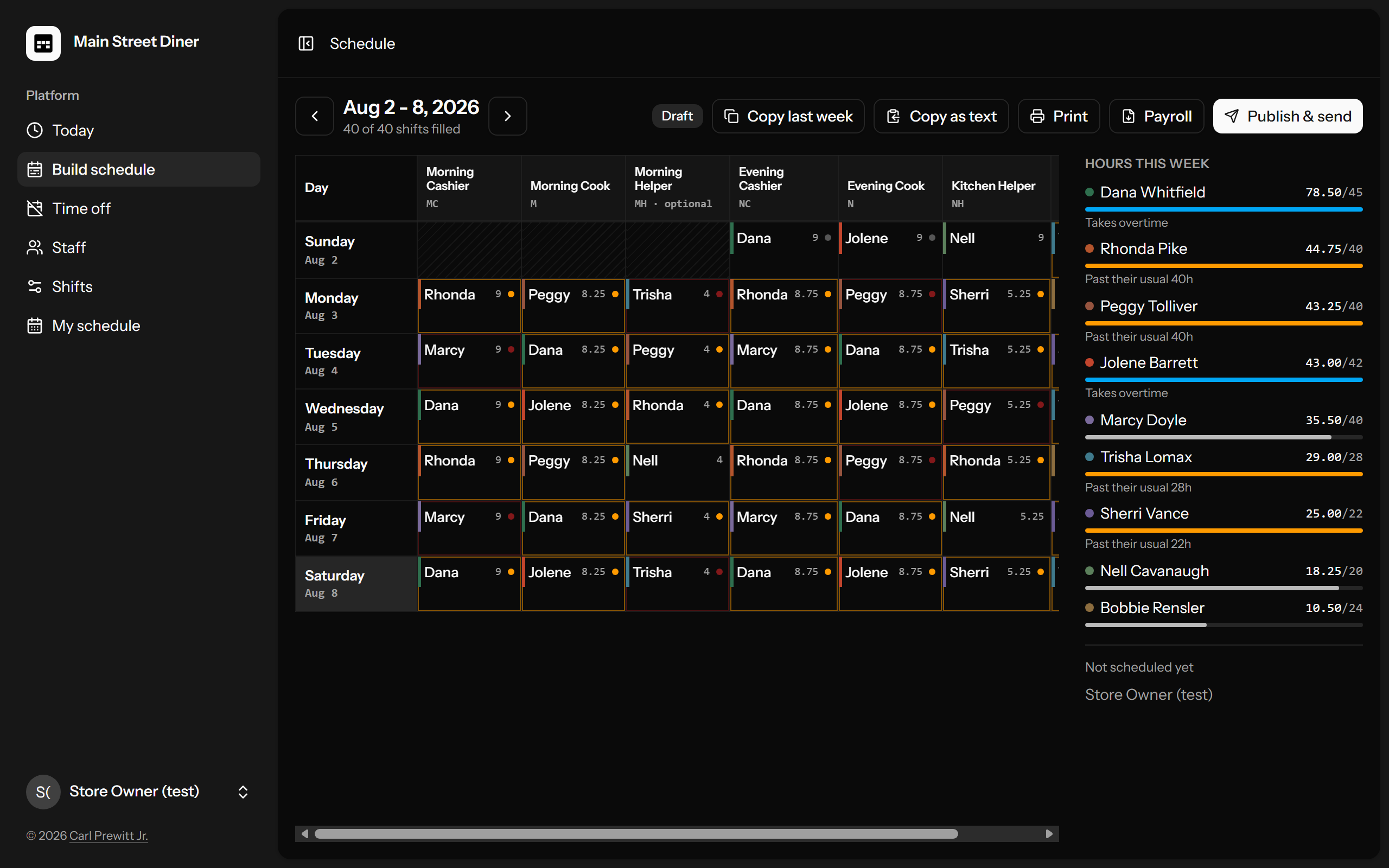
Build the week on a grid. Press one button. Everyone gets their own shifts on their phone. Built for shops that run on a paper schedule and a group text.
Mon
Tue
Wed
Thu
Fri
Sat
Sun
at 42.5h your call —
it won't stop you
Main Street Diner
That yellow tag is the whole idea. ShiftWall saw Jo go past 40 hours, said so, and then did exactly what the manager wanted. Warnings inform. They never block. The person running the store outranks the software, every time.
It warns.
It never blocks.
Over their hours "Puts Maria at 43.25h. She takes overtime." Said calmly, because you marked her as wanting the extra.
Asked for the day off The picker sets them aside and says why. Pick them anyway and it asks you to note the reason. Then your call stands — no more nagging.
Double shift, short turnaround A close followed by an open gets mentioned. A seventeen-hour day gets mentioned. Neither gets stopped. You know your people; the software knows arithmetic.
See it for real. Then drive it.
The pictures are the actual product running a fictional diner — and the demo is the same thing, live, for you to press the buttons yourself.

Try the live demo
Owner: demo-owner@example.com ·
Employee: demo-staff@example.com
Password for both: walkthrough
It's the fictional diner from the pictures. Build, publish, break whatever you like — it rebuilds itself every hour on the hour.
Everything the wall used to do. And the parts it couldn't.
Somebody's sick at 4:30. Covered by 4:37.
Mark them out. ShiftWall lists who can actually take the shift — qualified for the job, not already working, not on requested time off — with their hours next to each name. Tap one. Only that person gets the message. The group thread stays quiet, and the history remembers who called out and who showed up.
Publishing that never cries wolf.
First publish, everyone hears — including "you're not on this week," which is worth knowing. Change one shift and publish again? Only the people affected get a message, and it says exactly what moved: "Thu now Pizza 4p–10p (was Evening Cook)." Nobody learns to ignore the schedule, because it only speaks when something changed for them.
The time-off calendar, off the office wall too.
Staff request days from their phone. You approve or decline with a reason, they're told automatically, and the week grid shows who's off right on the day you're building. Approved time off sets a person aside in the picker — with the reason — instead of letting you schedule them into a vacation by accident.
The week leaves the app three ways.
Print a clean black-and-white copy for the wall by the register. Download payroll: each person's hours per day, already added up, straight into Excel. A shift somebody called out of earns nothing, automatically. Copy as text and paste the whole week into the group thread, same as the old screenshot, no retyping.
Set up in ten minutes, in plain words.
First sign-in, ShiftWall walks the owner through four steps: name the store, list the jobs people do, add the shifts that need covering, add your people. Every employee gets a one-time password shown in a box that waits until you've copied it — no self-signup exists, ever. Nothing technical, nothing to install on anyone's phone.
Yours. On your hosting.
ShiftWall installs on ordinary web hosting, the $5-a-month kind you may already pay for — cPanel, Plesk, or any panel; a plain VPS works too. Your schedule lives in your database, on your domain, hidden from Google and every AI crawler. No third-party services required to run it. No per-employee fees. If I get hit by a bus, your schedule still works Monday.
Scheduling apps: $30–70 / month forever
This week & every week — this sign never changes. Optional $150/year for updates & support. Skip it and ShiftWall keeps working. You just stop getting new features and my phone number.
Do the math they hope you won't.
A $50-a-month scheduling app costs $1,800 by the end of year three, and keeps going. ShiftWall costs $1,000 once, runs on hosting you control, and it's yours. The guide walks the install in seven plain steps — or I'll do it for you on request.
Email me what kind of business you run and how many people you schedule. I'll answer the same day.
Runs a real store Built for a small-town Texas convenience store and running its schedule every week — morning cashiers, pizza cooks, call-outs and all.
180 automated tests Every release has to prove the warnings warn, the publish maths is right, and history never gets rewritten, before it ships.
Private by construction Login-only, no signup page, invisible to search engines, AI crawlers refused by name. Your staff's hours are nobody else's data.
Fair questions
- Do I need a server?
- Ordinary web hosting, the $5–10-a-month kind that often comes with a domain. cPanel, Plesk, DirectAdmin, or your own VPS all work. The real needs are short: PHP 8.3+, a MySQL or MariaDB database, and a web server you can point at a folder. The complete install walkthrough takes about twenty minutes, no terminal, every step spelled out. No hosting yet? I recommend On Budget Services shared hosting — it's what I run. Rather not touch any of it? I install on request; email me.
- How do people get their schedules?
- By email, sent from your own hosting — no third-party service, no per-message fees. Publish once and every person gets their own shifts in their inbox. Plus the print copy for the wall and copy-as-text for your group thread.
- What do my employees need?
- A phone with a browser. There's no app to install. They sign in, see their shifts, and ask for days off. That's the whole job.
- My week starts Monday, not Sunday.
- You pick Sunday or Monday during setup. Whatever your paper schedule does today, ShiftWall matches it.
- What if someone forgets their password?
- You open their name and press one button. A new password appears once, ready to text them. Nobody can register themselves, ever.
- What happens if I skip the $150 a year?
- Nothing breaks. The app keeps running on your hosting. You just don't get updates or support. Rejoin whenever.
- Can it handle my weird shifts?
- Shifts are whatever you say they are — any job, any days, any times, different hours on Sunday, an "only when needed" extra pair of hands. You define them in plain screens, no code.
- Who sees what?
- Employees see the published schedule and their own hours. Managers build and publish. Pay rates are visible to the owner alone.